I’ve only been into travel hacking for a couple of years, but I have been around long enough to know how much time can be spent trying to get a good deal on an award flight. When we were planning our first trip to Europe, United miles was the only way for us to go. It was the only program where we had accumulated enough points in order to book flights for the whole family to Europe. In some respects, that made it easier for me. Just search the United website and nothing else.
Even then, our dates were flexible and our destination was flexible to some extent. When I was checking for available award flights, I would have to make multiple searches based on different destination airports and different dates. Honestly, it didn’t take too long to do these searches, because it was all on one website, and I actually find United Airlines’s website to be pretty good.
However, as we started to venture into more transferable points, such as Capital One Venture miles and Chase Ultimate Reward points, it became much more difficult. Chase alone transfers to 11 airline programs and Capital One has 15 airline transfer partners. Even if you narrow it down to just a handful of programs that you want to check, repeating the steps that I took on United’s website on 4 or 5 other websites can get pretty annoying.
The Rise of Flight Award Search Tools
I must not have been the only person who found myself with this problem because recently there has been an explosion in the number of good online award search tools, often with very powerful and free searches. All of them have their pluses and minuses. They include:
Now, have I tried all of these websites and done a point by point comparison to determine exactly the best website to use? Hell no! I have tried a few of them, but once I started to use Pointsyeah.com I latched onto it pretty quickly. I’m a firm believer that once you’ve found a tool that works for you, there’s no sense in continuing to look for a better tool. If I have a screw to tighten and I’m holding a screwdriver that works, I don’t go run to Home Depot to see if they have a slightly better screwdriver with a better grip. I just tighten the screw and move on with my life. That being said, Pointsyeah.com is a hell of a tool.
Basic Award Searching
Let’s look at a scenario, where you want to visit a friend in Phoenix, and you have a little flexibility on date. You just enter into the search bar your departure airport and the arrival airport, and a date range of up to 4 days. When you click the ‘Yeah!’ button it will automatically search for awards across a variety of airline award programs.

In just a few seconds, you will be presented with the results. In this case, the best deal is with Spirit Airlines for 4,000 points and $5.60 for a one-way flight from Chicago to Phoenix.
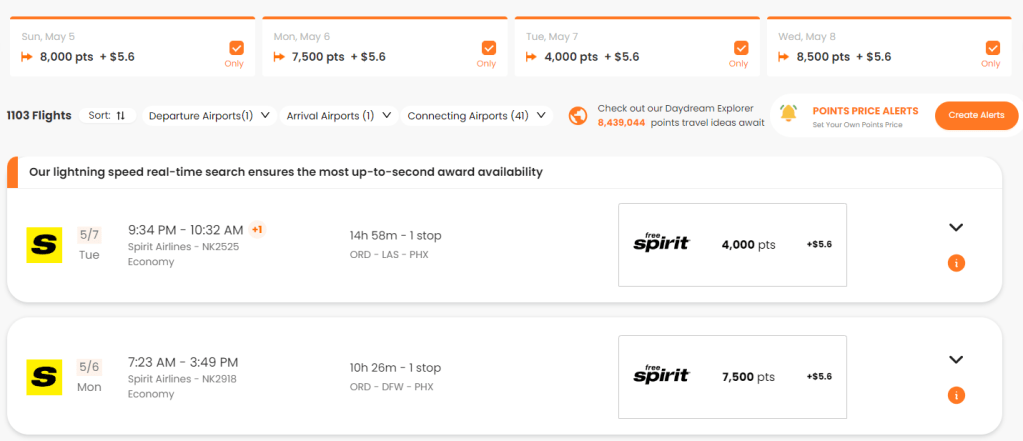
The problem with that is, that I don’t have Spirit points, nor a desire to fly Spirit Airlines. Also, that flight is almost 15 hours with connections – no thank you. In this case, you can scroll down, or you can filter out results from Spirit Airlines altogether, since it’s not really an option.
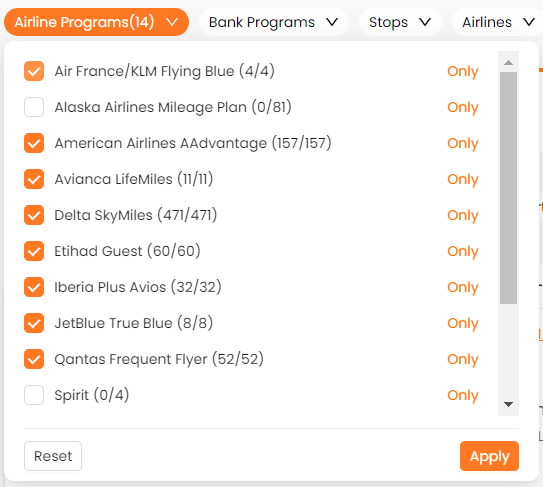
At the top of the screen, you will see a series of buttons that are preset filters. I want to filter out the airlines programs that I know I don’t have points for or transfer partners for, in this case, Alaska Airlines and Spirit Airlines. All you have to do is uncheck the boxes and click ‘Apply’ and view the new results.

This gives you another set of results, the top one being this Delta Airlines flight. The results here pack a ton of useful information into one tiny area. First, you will notice that the flight costs 8,000 Delta Skymiles and $5.60 in taxes. Secondly, you notice right above the Skymiles total you see the number of American Express Membership Rewards that are needed to transfer those 8,000 points to Delta. There is also (not on every result, but on some) a cash price listed. This is awesome, because you might just look at this flight and say that it’s cheap enough that you don’t want to waste your Skymiles or Membership Rewards points on it, you’ll just pay cash. Lastly, you can click on the down arrow to the right to expand the box to give you details about the flight itself.
But, what if you just want a direct flight? Well just go back to the top bar where all of the filters are and simply click on ‘Stops’ and then click ‘Non-stop only’. This supports multiple filters, so you will be able to search for non-stop only with the airlines that you don’t want to see already turned off.

Once you do that, you will see a number of results that fit the newly narrowed search criteria that you entered into the filters.

What is left is a series of direct American Airlines flights from Chicago to Phoenix for 8,500 points and $5.60. Perfect, now you know what to look for and can log onto the American Airlines website, search for this flight and book it.
Daydream Explorer is Awesome
There is a new feature that PointsYeah has added recently called Daydream explorer which is like a candy store for travel junkies. Rather than searching for individual flights from airport to airport, Daydream Explorer allows you to search airport to region, region to region, airport to country, country to region, basically anything that you can think of. On top of that, it allows for super broad time ranges like a couple of months.
Imagine you’re thinking “I’d like to go to Central or South America in April” – you can search for that and just see what comes up. Let’s say you’re local airport is MSP and you want to go south in April. Just search for MSP to Central or South America from April 1st to April 30th and abracadabra a list of potential flights you could take and their prices pop up.
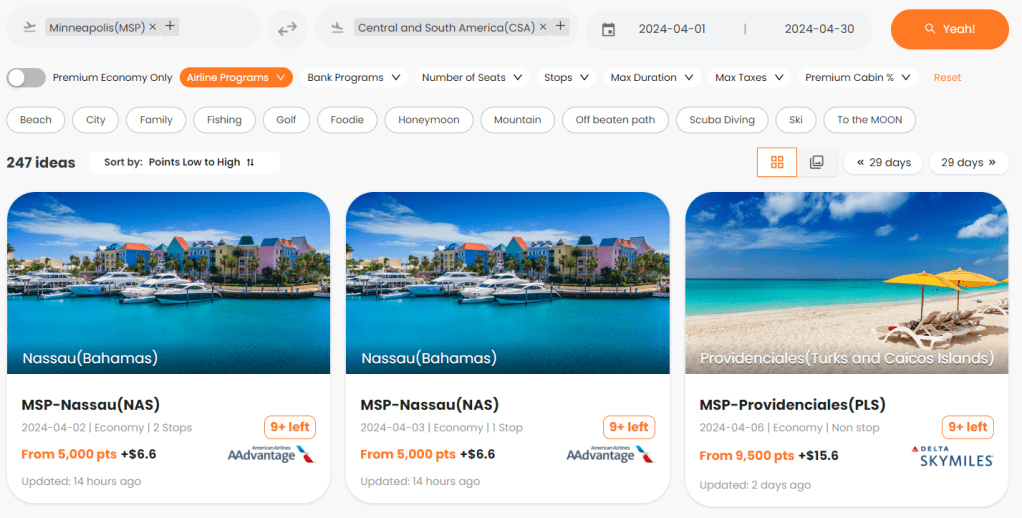
You will get a bunch of random results that you can sort by price, date or last update. This will allow you to browse a whole bunch of different ideas for taking a trip to Central or South America. You can also use the filters at the top to look for deals with certain airline programs or bank programs. You can even filter by number of stops or set a maximum that you’re willing to pay for taxes and surcharges.
If you’re thinking that you would like to go from New York to Spain in May in business class, just put in that criteria and search again.
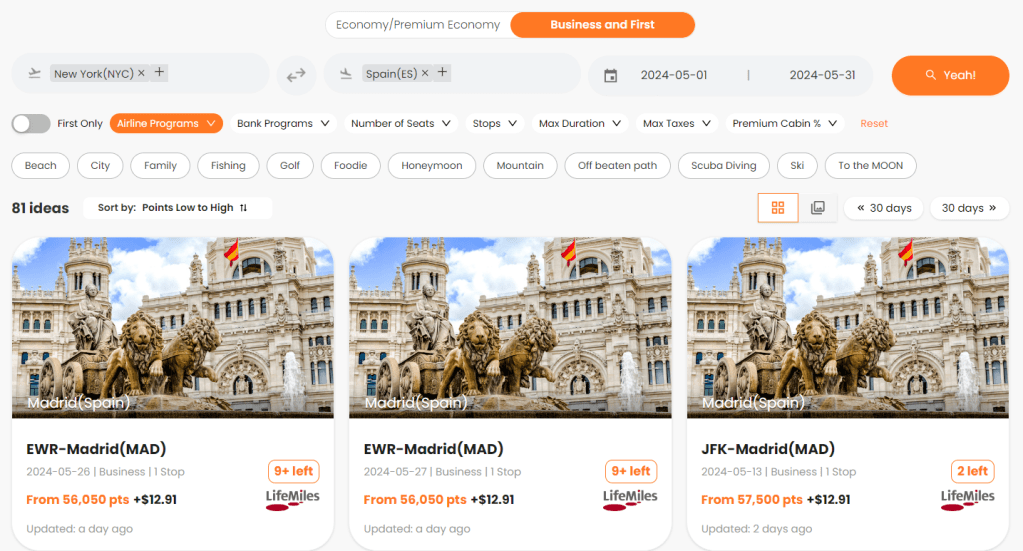
A group of results appear nearly instantaneously, allowing for the user to browse through and see if they find anything that they like. The results are so fast and the searches are so interesting that you can easily waste hours just window shopping potential vacations.
Let PointsYeah Send you Updates
PointsYeah also has a feature called Points Price Alert. This allows you to have PointsYeah send you an email when there is a flight available within the criteria that you set.
If I would like to get notified on a specific date if business class seats become available, I can set that criteria. In this case, I’m looking to book a flight home from Europe, and I know that Iberia does occasionally have business class flights available from Madrid to Chicago for 34,000 Avios, so I want to know if those seats become available on the day that I want to fly home. I simply put in the criteria that I’m looking for.
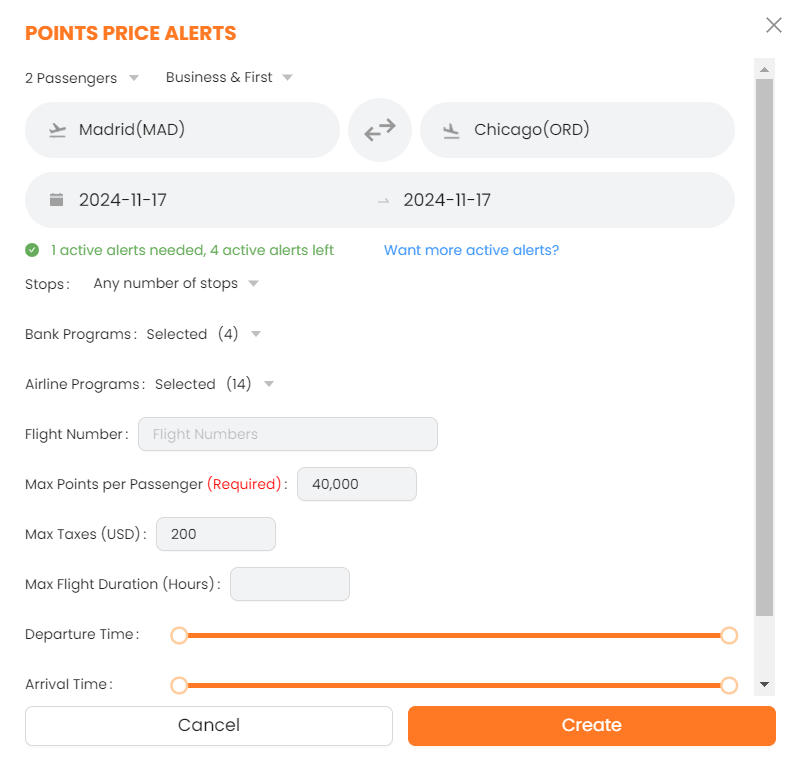
In this case, I want two seats, under 40,000 points and $200 in taxes and fees, per seat. I set that criteria and clicked create and now I will get an email if that Iberia business class award becomes available.

You are only allowed 4 flight alerts on a free account and each day counts as a flight alert. If you want to search this criteria but over a 4 day window, that would count as 4 searches.
Disclaimer
If you haven’t noticed, you will see on these searches that there is an updated date on these searches. The reason for this is because of how PointsYeah works.
What PointsYeah is doing is crawling the various airline websites and doing a ton of searches and saving the results. If they didn’t do this, these searches (especially the Daydream Explorer feature) would take forever because it would have to search each of those websites in real time and crunch that data (the websites would hate that as well, because it would create unnecessary traffic).
They are nice enough to let you know the last time that they searched those flights, because the older the search, the less likely it is to still exist, especially if it’s a particularly good deal. You always need to check the airlines website to see if the deals are still available. In other words, don’t transfer your Chase Ultimate Reward points to Flying Blue before you know that the flight you want to book is still available.
Free Vs Paid Account
Everything that I’ve talked about thus far is part of the free account. Why? Well I use a free account. I find it has all the features that I need right now and that’s just fine with me. However, if you want to have some additional features, you can pay for a subscription.
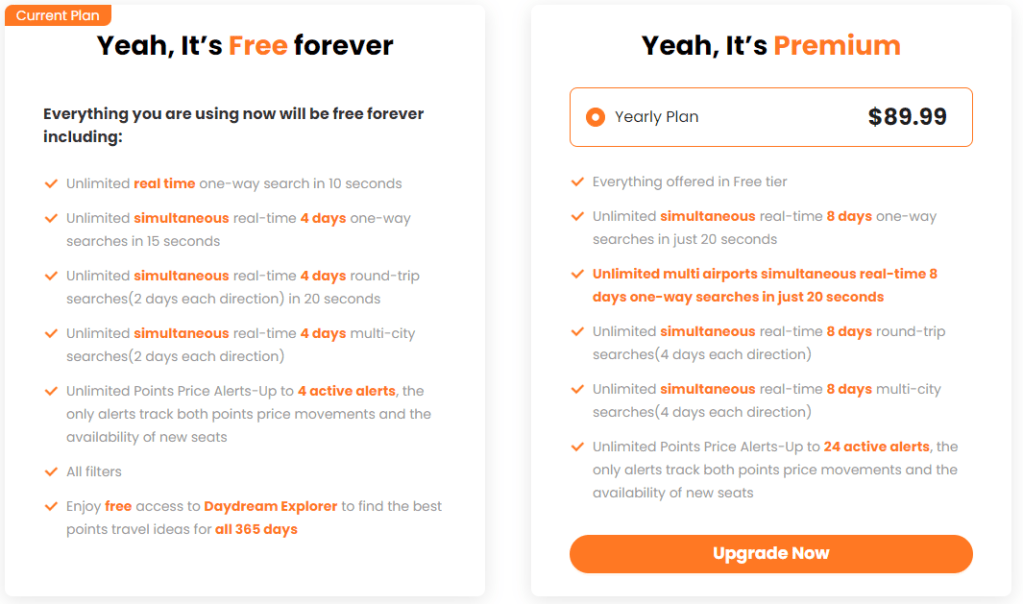
The main difference between the free and the paid memberships is that you can search for 8 days instead of 4 days on normal searches and you can set up as many as 24 alerts instead of the 4 that are available with the free version. The price of the paid membership is only around $8 per month, so if you find the additional alerts or the expanded date range useful, it might be worth the money.
Why I love PointsYeah
I always find it funny when people say they have a bucket list of places they want to go. The reason for that is that if I actually sat down and wrote a bucket list, it would be unbelievably long. I could probably think of at least 2 dozen places it Italy that would make that list. The biggest problem with a list like that is that the more I travel, the longer the list gets. As we visit places, we always hear about other places that we hadn’t heard of and that list just keeps growing.
What PointsYeah does for people like me, is to allow those of us with flexible places and dates, to dream a little better. Maybe you didn’t know that for 37,500 American Airlines miles and $44 you can fly from Chicago to New Zealand. Well you do now, and it only took a quick search to find out.

You might never have thought you could do that trip, but now you know whether it’s possible or not, and you did it without making multiple searches on multiple websites. Just one search gets it done. PointsYeah is an absolute gamechanger for me, I love it.

 Newby to Expert Traveler